Showing posts with label NHibernate. Show all posts

Monday, 28 November 2011

NHibernate query patterns redux– what does 3.2 bring to the table?

Some time ago, I wrote a brief cookbook of NHibernate query patterns. In this post I’m going to look at the same query patterns, but using some of the new features of NHibernate 3 – specifically the baked in Linq provider that makes querying a breeze. I’ve published the code for this to codeplex here.

If you want to follow along, you’ll need the adventure works sample database set up on your SQL server. I’m also going to ignore the mapping configuration for now, but in the sample code, I’ve used the HBM mapping format – if I were doing this “for real” though, I’d be using the new “Loquacious” configuration features to map up my domain classes – why it’s called Loquacious, I have no idea, but it’s basically a baked in replacement for fluent NHibernate.

Ok, so the tables we’re interested in for this exercise are shown below;

image

Find all addresses in the city of London.

Starting out nice and easy;

   1: var query = from a in _session.Query<Address>() 
   2:             where a.City == "London" 
   3:             select a;
Find all addresses in London, where postcode starts with SW

Still pretty simple, but a good test of how the provider translates the string operation “StartsWith” into SQL;

   1: var query = from a in _session.Query<Address>() 
   2:             where a.City == "London" && a.PostCode.StartsWith("SW") 
   3:             select a;

Find all addresses with a parent state/province that has a country/region code of GB

Querying down a join is simplistic;

   1: var query = from a in _session.Query<Address>() 
   2:             where a.StateProvince.CountryCode == "GB" 
   3:             select a;

Find all addresses with a parent state/province that has a country/region code of GB or FR

Still straight forward;

   1: var query = from a in _session.Query<Address>() 
   2:             where a.StateProvince.CountryCode == "GB" || a.StateProvince.CountryCode == "FR" 
   3:             select a;

Find all customer accounts with a "Home” address in the region of GB

Getting a bit more complex, we’re joining in the chain from customer to address to do some filtering. The query this generates is still nice and efficient;

   1: var query = from c in _session.Query<Customer>()
   2:             join ca in _session.Query<CustomerAddress>() on c equals ca.Customer
   3:             join a in _session.Query<Address>() on ca.Address equals a
   4:             where ca.Type.Name == "Home" && a.StateProvince.CountryCode == "GB"
   5:             select c;

Find all customer accounts with a “Home” address in the region of GB with more than one order

Now, this sounds complex, but actually, it’s the same query as above, but with some projections. No need to join the orders table in;

   1: var query = from c in _session.Query<Customer>()
   2:             join ca in _session.Query<CustomerAddress>() on c equals ca.Customer
   3:             join a in _session.Query<Address>() on ca.Address equals a
   4:             where ca.Type.Name == "Home" && a.StateProvince.CountryCode == "GB" && 
   5:                   c.Orders.Count() > 1
   6:             select c;

Find all customer accounts with a “Home” address in the region of GB with more than 2 orders and a total spend over $6000

Building on the last query, let’s do some more projections for our query.

   1: var query = from c in _session.Query<Customer>()
   2:             join ca in _session.Query<CustomerAddress>() on c equals ca.Customer
   3:             join a in _session.Query<Address>() on ca.Address equals a
   4:             where ca.Type.Name == "Home" && a.StateProvince.CountryCode == "GB" && 
   5:                   c.Orders.Count() > 2 && c.Orders.Sum( ov => ov.Total ) > 6000
   6:             select c;

In closing….

In my opinion, this makes life much easier than trying to remember how to use aliases, detached criteria and so on – although if you prefer that mechanism, it’s all still there, please yourself Smile

Wednesday, 29 July 2009

NHibernate N:N relationships

NHibernate provides the facility to map out many-to-many relationships without the need for the intersection table to be represented in the object model. Take for example, the following schema of Users, Roles and the intersection table that links users to many roles and roles to many users;

image

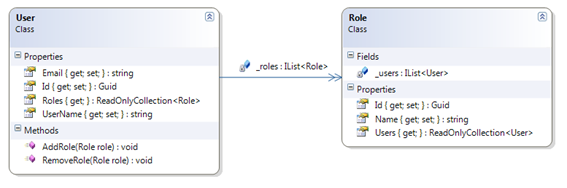
We then have the following object model to represent this;

image

or, in code if you prefer;

public class User
{
    // Fields
    public virtual Guid Id { get; set; }
    public virtual string UserName { get; set; }
    public virtual string Email { get; set; }

    // Storage for the roles that this user belongs to
    private readonly IList<Role> _roles = new List<Role>();

    // Accessor to list of roles - note we don't return list
    // that we can add/remove from - we use methods to do that
    // so we can implement any business logic.
    public virtual ReadOnlyCollection<Role> Roles
    {
        get 
        { 
            return new ReadOnlyCollection<Role>(_roles);
        }
    }

    // Method to associate a role with this user
    public virtual void AddRole( Role role )
    {
        _roles.Add( role );
    }

    // Method to remove a role from this user
    public virtual void RemoveRole( Role role )
    {
        _roles.Remove(role);
    }
}
public class Role
{
    // Fields
    public virtual Guid Id { get; set; }
    public virtual string Name { get; set; }

    // Storage for the users that have this role
    private readonly IList<User> _users = new List<User>();

    // Returns list of users belonging to this role
    // Notice this can't be added or removed from.
    // Nor is there any logic to add users into roles
    // as the link is maintained from the User object.
    public virtual ReadOnlyCollection<User> Users
    {
        get
        {
            return new ReadOnlyCollection<User>(_users);
        }
    }
}

Notice that the relationship between users and roles is maintained and owned in the user object, not role. The role object just gives us information about which users belong to a role, but we can’t add or remove users into it without loading the user and accessing it’s Add/Remove Role methods. We can map this out as follows (notice, I’m using Fluent mappings for NHibernate here);

public class UserMap : ClassMap<User>
{
    public UserMap()
    {
        base.Id(x => x.Id).GeneratedBy.GuidComb();
        base.Map(x => x.UserName);
        base.Map(x => x.Email);

        HasManyToMany<Role>(Reveal.Property<User>("_roles"))
            .LazyLoad()
            .AsBag()
            .WithTableName("UserRoles")
            .WithParentKeyColumn("UserId")
            .WithChildKeyColumn("RoleId")
            .Access.AsReadOnlyPropertyThroughCamelCaseField(Prefix.Underscore)
            .Cascade.All();
    }
}

public class RoleMap : ClassMap<Role>
{
    public RoleMap()
    {
        base.Id(x => x.Id).GeneratedBy.GuidComb();
        base.Map(x => x.Name);

        HasManyToMany<User>(Reveal.Property<Role>("_users"))
            .LazyLoad()
            .AsBag().Inverse()
            .WithTableName("UserRoles")
            .WithParentKeyColumn("RoleId")
            .WithChildKeyColumn("UserId")
            .Cascade.None();
    }
}

Notice that the role map has .Inverse() set, which indicates that it is not the owner of the relationship.

That is pretty much all there is to it, NHibernate will take care of maintaining the relationship table for you.

Tuesday, 28 July 2009

Query NHibernate – Simple query patterns

There are a variety of ways to query NHibernate, including using HQL, the criteria API, Linq2NH, and the criteria API tied up with the Lambda extensions. My preference is the criteria API as it’s a powerful way of expressing dynamic queries. I’m going to explore how we go about implementing some of the more basic query patterns using this API;

Given the following database as an example, where a location can be split into multiple sub-locations, each sub-location belonging to a cost centre, we’ll drive out some simple queries;

 image

First off, a simple location query by name;

ICriteria c =
    session.CreateCriteria(typeof(Location))
    .Add(Restrictions.Eq("Name", "Manchester"));

Next, a query that will check the name contains particular text and the postcode starts with text provided.

ICriteria c =
    session.CreateCriteria(typeof(Location))
    .Add( Restrictions.Conjunction()
        .Add(Restrictions.Like("Name", "%manchester%"))
        .Add(Restrictions.Like("Postcode", "M60%")));

How about looking for all sub locations where it’s parent location has a postcode of M60*?

ICriteria c = session.CreateCriteria(typeof(SubLocation))
    .CreateAlias("Location", "l")
    .Add(Restrictions.Like("l.Postcode", "M60%"));

Going further, how about finding all sub locations where some text can be found either in the sub location name, the location name, location address, location postcode or cost centre name? Simples….

ICriteria criteria = session.CreateCriteria(typeof(SubLocation))
    .CreateAlias("Location", "l")
    .CreateAlias("CostCentre", "cc")
    .Add(Restrictions.Disjunction()
        .Add(Restrictions.Like("Name", freeTextToMatch))
        .Add(Restrictions.Like("l.Name", freeTextToMatch))
        .Add(Restrictions.Like("l.Address", freeTextToMatch))
        .Add(Restrictions.Like("l.Postcode", freeTextToMatch))
        .Add(Restrictions.Like("cc.Name", freeTextToMatch)));

What about finding all locations that have more than one sub location?

DetachedCriteria subquery = DetachedCriteria.For(typeof(SubLocation))
   .Add(Restrictions.EqProperty("l.Id", "Location.Id"))
    .SetProjection(Projections.Count("Id"));

ICriteria criteria = session.CreateCriteria(typeof(Location), "l")
    .Add(Subqueries.Lt(1, subquery));

It’s a bit more complicated, but the first bit creates a reusable query that will look for sub locations where the sub location’s parent location Id is of the same value as the Id property of the aliased object “l” passed into the query. It then projects the results into a count against the Id property.

The second part then creates a criteria that will find all locations, aliased as “l” (for the sub query above), and execute the given subquery, ensuring that the result is > 1.

Finally, getting a bit more complex, find all locations having more than one sub location in cost centre named “ENGINEERING”?

DetachedCriteria subquery = DetachedCriteria.For(typeof(SubLocation))
        .CreateAlias("CostCentre", "cc")
        .Add(Restrictions.EqProperty("l.Id", "Location.Id"))
        .Add(Restrictions.Eq("cc.Name", "ENGINEERING"))
        .SetProjection(Projections.Count("Id"));

ICriteria criteria = session.CreateCriteria(typeof(Location), "l")
        .Add(Subqueries.Lt(1, subquery));

Wednesday, 21 January 2009

NHibernate and schema creation/update

A colleague of mine today enlightened me about one of the features in NHibernate that lets you completely ignore the whole issue of managing and updating database schema. You can use NH mappings to define the entire schema and let NH worry about creating the database and updating between the different versions.

Back in the day I used to build data first, designing ERDs and sprocs before writing any code, and so I was a little worried about indexing, constraints, naming foreign keys and such like, but the schema is more than capable of articulating this too.

Tying this up with Fluent NHibernate, strongly typed mapping files / auto map and you have a very powerful, quick to implement platform for domain driven data access.

Here's an article that tells you all about it better than I can;

http://blogs.hibernatingrhinos.com/nhibernate/archive/2008/04/28/create-and-update-database-schema.aspx

Friday, 14 November 2008

Day 5 - 10:45 : Data access smackdown! Making sense of Microsoft's new data access strategy (DAT02-IS)

Stephen Forte, Chief Strategy Officer from Telerik, started this interactive session reviewing the history of Microsoft's data access offerings and then discussing the latest multitude of choices. As this was an interactive session, there were lots of questions, comments and debates going on throughout.

A quick history - Microsoft gave us ODBC, then DAO with JET was sat on top of this, RDO wrapped DAO and ODBC, and then there was ODBCDirect. I can remember working with all of these technologies, so I must be getting on a bit now! (not really, I'm 35, technology just changes quickly). Anyway, from this they gave us ADO and with the release of .NET, we got ADO.NET.

Today we have a bunch of options available and moving forward into the future, we're going to have even more choice. Sat atop of ADO.NET we have the conceptual model LINQ technologies (LINQ to SQL, XML, Entities, REST) along with cloud services (Azure) and SSDS (now SDS). That's without even thinking about 3rd party solutions like NHibernate, SubSonic etc - although these were also discussed.

The debate was on-going concerning which technology should be used in which context, and as ever - there is "No Silver Bullet" - the stock answer to such a question is, and should be, it depends.

Choosing which data access strategy you use should be one that gives the highest return for least complexity - not just the one that seems the most technically pure as this is purely subjective - eg: "objects first" people are going to look for OR/M, "data first" guys are looking for T-SQL and so on....

If this means you want OR/M and are using TDD or you need facilities like lazy loading (and you don't always!), then avoid the entity framework - which doesn't cope well with either. In that scenario, perhaps you'd stick to NHibernate. On the other hand if you want highly optimised database queries and you want full control over them for whatever reason, use plain old ADO.NET. Maybe if you're writing a system that doesn't need lazy loading or you're not using TDD, then perhaps the entity framework is a great way to very quickly get started using entities with very little code.

I get frustrated by dogma and elitists saying there's only one way to do things - the way they do it! We all have our preferred way of working, and I'm the first to promote various strategies and techniques as being good options, and sure, I'm occasionally guilty of being dogmatic, but dogma hurts objectivity - we should always consider the project in question and what is best for it rather than fly flags and banners.

Stephen was questioned about, and acknowledged the vote of no-confidence and it's validity - and he made a very, very good point - this is V1 of the framework. The guys involved in EF are aware of it's limitations and are working to resolve them, but are heading in the right direction at least. Personally, I feel I came out of this session a little less dogmatic and a little more objective.