Friday, 18 February 2011

Garbage collection in .NET – large and small object heap differences.

As promised in my previous post, I’ve just uploaded source code to codeplex (http://netgarbage.codeplex.com) which demonstrates the differences between the large and small object heaps and how allocating memory to the large object heap needs to be considered in applications that shifts large quantities of data around.

In this project you will find 4 main tests (not unit tests, I created this as a build and run console application);

  • TestInterlacedMemoryAllocationResultsInOutOfMemory
  • TestNonInterlacedMemoryAllocationDoesNotResultInOutOfMemory
  • TestInterlacdMemoryAllocationWithFullReleaseDoesNotResultInOutOfMemory
  • TestSmallObjectHeapInterlacedAllocationDoesCompaction

image

TestInterlacedMemoryAllocationResultsInOutOfMemory
This test demonstrates one of the fundamental considerations of the large object heap. You will recall from my previous post that objects that are greater than 85000 bytes will be allocated onto the large object heap (LOH) instead of the small object heap (SOH) and the LOH does not compact memory when it collects unused memory. Rather it leaves behind holes. As such, allocating memory in a manner that is interleaved and then releasing every other block will leave small holes behind.

The net result of this is the application has lots of free memory overall, but it’s only available in small chunks. As allocations require the object being allocated to be laid out in memory in one contiguous block, trying to allocate an object that would appear to still fit in memory will fail as there is no hole in the LOH big enough to accommodate it. The result in this test is an out of memory exception;

image

TestNonInterlacedMemoryAllocationDoesNotResultInOutOfMemory
The second test does exactly the same as the first, but rather than interlacing the memory it tries to allocate larger chunks together which means when one list of data is released and cleaned up, the allocation of large objects continues to function as there are holes in the LOH big enough to accommodate;

image

TestInterlacdMemoryAllocationWithFullReleaseDoesNotResultInOutOfMemory
This test attempts to prove the reason that the first test fails with an OutOfMemory exception is because of the fragmentation – it does exactly the same as the first test, but releases both lists and sure enough, as expected, the further allocation succeeds.

image

TestSmallObjectHeapInterlacedAllocationDoesCompaction
For completeness I included this test to prove the difference between the SOH and the LOH. It does the same as the first test, allocates memory until it’s full by interleaving objects in two lists and then frees one list. (The objects are smaller to ensure they get allocated to SOH not LOH). As you will see, this test successfully allows memory to be allocated after just one list is freed because the garbage collector performs the compaction phase on the SOH, reshuffling memory to close the holes.

image

Get the source code here: http://netgarbage.codeplex.com

Thursday, 17 February 2011

Garbage collection fundamentals in .NET

Today I was asked a few questions about how garbage collection works, and it dawned on me that even though we’re on .NET 4.0 these days, there are a lot of .NET developers out there who don’t actually understand the mechanics of the garbage collector. So, even though this article is probably 10 years too late for a lot of people, I hope my rudimentary explanation will serve useful to those that don’t know about the concept or what it offers them. I’m going to cover;

  • What garbage collection is.
  • Some general information about the .Net garbage collector (GC)
  • What actually happens when you allocate an object.
  • The .NET garbage collection process
  • What the different generations are and what purpose they serve
  • How a GC gets triggered.

What is garbage collection?
Garbage collection provides an abstraction to the programmer that means they don’t need to worry about how memory is allocated and freed. In unmanaged code a programmer would need to allocate and free every byte their application used, using malloc() and free() (in C - new and delete in C++) and this has often been the source of numerous bugs in software, and they are often the hardest to track down.

Higher level languages like .NET take this burden away from the programmer by using garbage collection. The runtime takes care of tracking references to objects and understands when an object can be safely let go, so you can safely write;

void MyMethod()
{
    SomeLargeObject obj = new SomeLargeObject();
}

Instead of;

void MyMethod()
{
    SomeLargeObject obj = new SomeLargeObject;
    delete obj;
}

In the latter example, if you forgot to delete the allocated object, the memory it consumed would essentially be lost, a typical memory leak. With the former example, the garbage collection understand the object no longer has any active references and it gets garbage collected and disposed of during a GC cycle.

.NET garbage collection
In .NET the garbage collector runs in one of two modes – synchronous and concurrent (often referred to as workstation and server). When the GC determines it needs to perform some clean up, synchronous mode will pause the executing process, quickly clean up, and then resume the executable, whilst in concurrent mode (the default) the clean up executes in the background without blocking your application.

It’s important to note that every application has a maximum amount of memory that it can allocate objects to – this memory is known as the heap, and the size available is dependent upon the O/S. A 32 bit O/S can only allocate a maximum of 2Gb by default (can be increased to 3Gb with a boot config), whilst on a 64bit O/S, this is significantly higher (8Tb from memory, but don’t quote me).

The GC doesn’t run continually, and this is an important observation to make, it runs whenever certain conditions are met, which I’ll discuss shortly, but the important thing to note is when an object is no longer referenced it may not necessarily be collected immediately – rather it will be collected the next time the GC runs. This can be problematic for some objects that perhaps hold locks on contentious resources. Holding a file handle for instance – holding that for too long would be a bad thing as it could be a while before the handle is released freeing the file for access to other processes or other areas of your code.

To cope with this scenario .NET has the IDisposable interface. By implementing IDisposable, you write code to release these contentious resources when the object is no longer needed, but before the object holding them is actually collected. By wrapping the use of an IDisposable object within a using statement the dispose functionality will be called when the reference goes out of scope (when it drops out of the using block), thereby releasing the file handle in our example and making it available to other processes. You can also invoke the dispose functionality of an IDisposable manually by calling Dispose on the object, but the using statement is less prone to forgetfulness!

The actual memory used by the object will still only be released later, when the GC runs.

What happens when you allocate an object
Before we look further at the GC, it’s important to look at what happens when you “new up” an object. It is allocated on the managed heap, of which there are two with subtle differences – the small object heap and the large object heap.

The small object heap
Small objects ( those requiring less than 85,000 bytes) will be allocated on the small object heap. When the GC runs and reclaims space on the small object heap it does one thing different that the large object heap doesn’t – it compacts memory. It removes the holes left in the heap by the now vacant memory – more on this shortly.

The large object heap
When you allocate objects larger than 85,000 bytes (these are bytes within the object itself, not the objects it references), these are allocated on the large object heap, which doesn’t compact memory because of performance limitations (moving large chunks of memory around is slower), so it leaves holes in the heap and this should be considered in the design of your code, again I’ll explain why shortly.

Taking out the trash
When a garbage collection is triggered it runs through 2 phases – a marking phase and a compacting phase.

The marking phase is all about marking which objects are still in use and which ones aren’t. It starts by walking through all known objects from something called GC roots. A GC root is an anchor point on which objects are tracked – a GC root is any local variable in the currently running method, a static variable or managed objects passed to unmanaged code – these roots become the starting point for garbage collection, objects with finalizers are also roots and these take 2 GC cycles to get rid of – one to release another to finalize (although this can be changed by calling GC.SuppressFinalize from your dispose code).

So, the GC examines all objects to see if they can still be reached by any other live object, starting with the GC roots. If an object can be reached it is marked as still live and on it goes until it’s determined the state of all the objects being tracked. Each object is checked only once, if a reference has already been walked, it stops – this allows circular references to exist in your graphs.

At the end of the mark phase, the memory that wasn’t marked live is released and the compacting phase begins. This compacting phase only occurs on the small object heap – it doesn’t do this on the large object heap as it would be performance intensive (moving large chunks of memory around). The compacting phase is all about closing the holes in the heap. Take the diagram below - Let say you allocate 3 objects on the small object heap, named Obj1 to Obj3 – they are allocated sequentially onto the back of the heap. When Obj2 is no longer used, it gets cleaned up by the garbage collector and the compaction phase re-organises the heap to remove the hole that it left;

image

This has a number of advantages – first, when allocating a block of memory it must be allocated in one contiguous block otherwise the request to allocate will fail with an OutOfMemoryException. If you had holes in your heap of say 850 bytes each, but totalling 1,000,000 bytes free, you could still only allocate 850 bytes as the largest object because that would be the largest piece of contiguous memory available, so reshuffling the small object heap like this keeps your memory lean and mean.

A side effect of this is that new allocations become extremely quick as they are always to the end of the heap, there’s no need to scan for the space, the space is just there all in one block, there’s either enough space or there’s not.

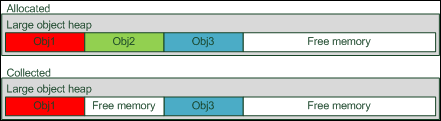
The large object heap is a different beast. If you recall, any object over 85000 bytes will be allocated from the large object heap, which gets collected but doesn’t do the compaction. Taking our example above of 3 objects going on the large object heap you would have;
image

Notice the hole. If an allocation comes along that fits into this hole, it would be used, but no compaction is done. This can have implications – say you were to allocate two lists in an interleaved manner (so allocate a new object into list A, then a new one into list B) with each element on the list being 10mb. You do this say 100 times, so you allocate a total of 10 x 100 x 2 = 2000mb. Let’s say that’s the total amount of memory free and you’ve now stuffed your memory full to capacity.

Releasing one of these lists will give you back 1,000mb, but the largest chunk of memory available on the large object heap will be 10mb because the memory is in sequence and it doesn’t get compacted. As such, any allocation to the large object heap from that point that is over 10mb will fail with an OutOfMemoryException. So you see, when working with large amounts of data this is a consideration to bear in mind. I’ll explore this more in a future post with some sample code that I’ve written to demonstrate the point.

I should point out now that this is a slight oversimplification – the GC doesn’t actually check and mark every object, the GC runs against different generations.

What are these generations all about?
The GC in .NET has the concept of generations. A generation is a queue of the objects on the heap that represents, I’m tempted to say age of the object but that isn’t strictly true, rather it indicates the stickiness of an object. Freshly allocated objects on the small object heap are given generation 0 (there are three generations in total, 0, 1 and 2) indicating they are fresh and are therefore the most likely to be cleaned up next. Think about it, fresh objects you usually allocate, do something to them and then they are finished with.

So new objects, on the small object heap are given an initial generation of 0. When the GC runs, it can do so against a generation – generation 0 will clear only generation 0 objects that are no longer referenced, generation 1 will do 0 and 1 and finally generation 2 (known as a full garbage collection) will clear generations 0,1 and 2. As an object survives a garbage collection, it is promoted to the next generation up.

What this means is the next time a generation 0 collection is run, it won’t bother checking the promoted objects because it’s quite likely that those objects are still referenced, after all they survived one or more GC cycles already and so those objects won’t be collected until a more aggressive GC is executed. Promotions only occur of course up to generation 2, so if a gen 2 object lives through a GC cycle, it will still be gen 2.

The only additional thing to mention with this is that large objects (on the large object heap) are allocated as generation 2 directly whilst small objects are allocated as generation 0. You cannot manually allocate a generation 1 object.

When does a garbage collection start?
And so, the last thing to talk about is how a GC is initiated. There are 3 mechanisms;

  • Generation thresholds
  • Manual collection
  • Low memory conditions

Manual collection and low memory conditions
I’ll cover these two first as they are the simplest. If the hardware your code is running on is starting to run low on memory resources, your application will be notified and will automatically trigger a GC cycle – this is all handled for you, no code required, whilst the other mechanism is to manually call GC.Collect which will in turn perform a garbage collection cycle against the generation you passed as a parameter (plus any below it). This can be useful, but calling it is reasonably rare and you’re better off relying on the thresholds.

Thresholds
Each of the three generations has a GC threshold. When the heap is starting to fill with objects it may start to encroach on one of these thresholds and when it goes, the GC cycle for the generation in question will be triggered. This could result in object promotion to other generations which in turn may trigger further threshold collections. You don’t manage these thresholds directly, the runtime will dynamically tune the thresholds for you.

Summary
So that’s my hamfisted attempt at explaining the garbage collector in .NET, I hope it comes in handy for someone, it was certainly useful to refresh my own memory! I’ll post code in the next few days that demonstrates what I mentioned about the large object heap and fragmentation that will hopefully make some of this clearer.

Tuesday, 15 February 2011

SDLC – Productive development teams.

Since I started running and managing teams, about 10 years ago, I’ve been trying to put my finger on what it is that makes a productive development team. Of all the teams I’ve worked with, what makes one team perform better than the others if we consider that both teams are filled with equally capable members. Now, I’m not asking what makes the developers more productive as in what characteristics do they have personally, I’m asking what do we, as management, put in place in terms of environment and culture that allows one team to succeed more than another.

Over the years I’ve identified, read, and learned about a number of things that motivate technical teams, but I think there are two aspects that are the most crucial. We must provide technical teams with;

  • A quiet place to work with less interruption.
  • Authority and ownership of their work.

A quiet place to work
I’ve known this for 18 years, since I first became a developer - developers need a quiet place to work, with few interruptions. This fact is by far, THE most important thing we need to put in place to get the best out of a development team. These days I spend around half of my time doing non-development work; meetings, design sessions, writing specs, planning and all that kind of stuff, but the other half of my time I’ve usually got my head in visual studio, writing code, and I can tell you that a noisy working environment is still the primary thing that stops me from getting things done. All developers find it difficult to work when sat next to the call centre, or sat across from Jean from accounting who can’t stop telling everyone about how her two cats have wonderfully expressive expressions and how they smell divine when they’ve just been given a kitty bath – nice!

When a developer is writing code, they have in their head a plethora of details about what they are doing – class names, method names they need to call, variables they need to populate, and sequences they need to follow. They are thinking about the layer they are presently working in, the UI lets say, but are contemplating changes up the stack into repositories, domain objects and/or the database – all of this is being worked out, real time, in their heads.

Now, think about it, you’ve got this big jenga stack of information in your grey matter when Jean decides to tell you again about how Fuddles can smile when she says kitty kat – see what happens, your concentration is shattered, the jenga bricks all fall down and you now need to spend 5 or 10 minutes picking them up again – you essentially stall and get thrown out of  “The Zone” and it takes time to get back into it.

Joel Spolsky articulates this, and some of the math behind getting into and out of the Zone, in a much better way than I ever could, so I encourage you to read his articles or book  “Joel on software”.

So how can management address this quiet place to work issue? This is the tricky part – ideally you want each developer in their own office, with a door they can close when they want no interruptions, but this unfortunately usually results in laughter with the board who just don’t understand how a developer does their job. You can convey with explicit detail why but 9 times out of 10, they won’t put the partitions up.

At the very least, get your development team insulated from the rest of the business. One partition to create a “development office” will go a long way to reducing the noise distraction from the rest of the business in the open plan environment but this is only a 15% step in the right direction. You’re still going to have in-team distraction, where developer A decides it’s quicker to ask developer B a question rather than spend 2 minutes hunting down the email that gives him the answer and the partition will only be a minor deterrent from Dave from support waltzing in and interrupting everyone at the same time, but a 15% step in the right direction is still better than Joan and her cats.

Moral of the story – you might not be able to go the whole hog and get every developer into a private office, but do something.

Authority and ownership
In my current role, I’m assigned a project to take on, I get a briefing and then I’m left to it. Sure there are governance reviews every few months, we usually have a project manager assigned to interface the client commercially and do the paper pushing such as weekly status reports back to the businesses (ours and the clients) to keep everyone happy, but from a technical design, development and team management perspective, I’m on my own – I take full ownership and responsibility for everything we do, and that my friend is empowerment which breeds motivation!

Now consider Kevin. Kevin works for the antithesis of my company and they are total control freaks, they need to micro manage the soul out of Kevin so that they know he’s doing exactly what they want him to do – even if they are the one’s in the worst position to be making technical decisions! Kevin gets on with code, line by line, writing to specification exactly what the management team are looking for, they check up on him hourly, tell him to change his code to work slightly differently and eventually Kevin either quits or comes into work with an AK47 and mows down the management team.

That’s an extreme example, but I have honestly seen that – well, not the AK47 part. I’ve been in more than one organisation before where the developers and architects are micro managed from up on high, told which technologies to use because the On-High-Manager had a conversation with someone the day before and decided that Service-Orientated-Entity-Hibernate was the up and coming technology that is the silver bullet for all their problems – the development team protest but are shot down and told to just get on with it and what do you know, 2 months later, they call in someone like me to help them work out what their problems are.

Developers need to own their work. Sure, architects and SDMs can put in place frameworks and prescribed approaches, but ultimately developers are a creative breed and so let them be creative, don’t confine them to a hell of micro management, give them a task, set some boundaries (the general architecture) and let them get on with it.

Now, I can hear some of those micro managers screaming now “what about the slackers” and the “people that take the proverbial”. Well, there’s three things I’d say to that. Firstly your recruitment process is wrong, Second, the reason they are slacking is more likely because of their lack of motivation due to being brow beaten daily and Three, your lightweight management process will weed out those who just, bluntly, aren’t up to standard.

Recruitment process
I say your recruitment process is wrong because if you have slackers or proverbial takers on your team, your process wasn’t good enough to weed them out. Did a couple of technical and highly motivated, passionate people interview them? Were they given a technical test to test their programming skills? Were they given a logical test to test their thought and reasoning? If not, your recruitment process is wrong and you’re going to let through some people who should be doing something else with their time, but shouldn’t be writing code for a living.

Brow beaten
When you’re running your development team in micro management mode, developers, who are creative by nature, start to lose motivation. When they have a spec that says, write some code, like this, that is so detailed that they have no creative input, they would probably sooner spend a day on facebook than actually write that stinking code you’ve told them to write. This is not the fault of the developer, this is poor management – it’s your job to remove things from their path that stop them doing their job and motivate them to do their best work whilst their job is to write beautiful code.

Lightweight management process to weed out the useless
So whilst I’m saying have more of a hands-off approach to management, you will still have a management method that will allow you to compare apples with apples. SCRUM is obviously one of my favourite approaches to running iterative development and it’s this that I think gives you a good tool to be able to monitor the performance of all developers and identify those who are struggling.

By working out what work was delivered by each individual in each sprint, you get not only a team velocity (how much work a team can generally carry out in each iteration), but also a velocity per team member. Now if Dave and John are hitting 40 points in a 2 week sprint but Alan is only hitting 10, you’ve got to ask why Alan’s productivity is so low – you don’t need to be all “up’in’Alan’s’Bizniss'” and micro manage him, you just need to identify his velocity slump and then ask what the problem is – if it’s because his cat died this week and so couldn’t get in the Zone, then fine, send him to grief counselling, but if it’s because he just can’t do the job, give him some opportunities to skill up but then I’m afraid it’s time to weed him out – you only want people on your team who get things done.

Conclusion
I’m not saying these are the only two things that you need to do to motivate a development team, but I am saying they are the two most important out of a long list. There’s more to the list, but others smarter than I have already covered this in detail (comfy chairs, large monitors, powerful pc’s, interesting work, the best tools and so on). If you can do only two things to motivate your team, I strongly urge you to do the two things above.

Monday, 14 February 2011

Prism, MVVM and Silverlight – the finished article.

In my previous article I set out to create a simple Silverlight application using the prism framework and the MVVM pattern. I chose what I thought would be quite a straight forward application to build, something that would mirror the iPad application, Popplet (links: Website, get it on iTunes) – which as I said in my earlier post, is a pretty neat little app that lets you essentially drop post it notes (text or image) onto a canvas, drag them around into some layout that makes sense to you and connect the various boxes.

iPad Screenshot 1

So, this distilled down to the following user stories;

  • As a user I want to see a canvas of notes.
  • As a user I want to be able to add a new note box to my canvas.
  • As a user I want to be able to rotate or resize any of my note boxes on my canvas
  • As a user I want to be able to connect note boxes
  • As a user I want to be able to delete note boxes
  • As a user I want to be able to zoom in and out
  • As a user I want to be able to drag my canvas around
  • As a user I want to be able to click a button to zoom out to the extents of my canvas so far.

I’ve spent about 12/13 hours building this in total, over 5 sessions, from scratch, learning some of the concepts as I’ve gone and I’ve delivered all of the user stories above with the exception of the ability to connect note boxes - basically I’ve run out of time to add that, but it should be trivial to add by creating another canvas layer in our control template that is used to render connector lines.

This was an exercise not only in how best to work with Prism and MVVM but also in how I might best implement a reasonably complex control – the designer surface and whilst I’m impressed with how quickly I was able to build this little app (I think it could be done within a day easily), I also think that my approach is actually the wrong one.

The way this application works is we have a custom control, the diagram canvas which contains all the functionality for zooming, panning and so on, and then the items themselves are rendered using a data template. Two data templates in fact – one that dictates how the standard node should be rendered, the other dictating the rendering of it when it’s selected – in which case it is adorned with resize handles, rotation handles, a button to delete the entity and a textbox to change the text (there is no adornment layer in SilverLight it turns out!).

This all works, but it doesn’t feel very flexible. It’s pretty much impossible to represent more than one shape type – the list of “stuff” you bind to all gets rendered through one data template, so that makes life difficult.

It also feels quite tightly coupled and doesn’t have clean separation of concerns (eg the diagram component has code in there to find UI elements within a data template that should be refactored out). Anyway, the exercise has proven it’s point, but if I were to do this again, I’d try to be a little more flexible and use different controls (+control templates) for different types of shape (all of these shape controls would implement IShape) and expose a property that describes their adornments – so some IShapes would adorn themselves with a RotatorAdornment and SizerAdornment whilst others might just have EditTextAdornment and so on. Composing the controls in this way would be much more flexible, and the view model would have the responsibility of transforming our domain data (the model) into the shape data collection the canvas is binding to and vice versa.

Anyway, for now, this is what the application looks like, it works, it does what it says on the tin, but it’s perhaps not the best implementation. You can grab the source from http://silverpop.codeplex.com.

sp-bettershot

Tuesday, 8 February 2011

Hmmm– what happened to my brain?

I’ve been reading the excellent “Joel on software” and “More Joel on software” books recently (by Joel Spolsky obviously) – I’ve got to say I wish more people had his insight into what motivates and drives a good developer to work well. I’ve lost count of the number of clients I’ve turned up at to find brow beaten developers sat next to the telesales department staring at postage stamp screens and wondering why their productivity is so low….

Anyway, I’ve got a few things to say about that myself, but I’ll save it for another day, today I’m thinking about some of the stuff Joel talks about with regards to groking pointers and how programming is getting easier, or should I say dumbed down (due to University teaching higher languages such as Java rather than C, C++ or assembly)  and I looked back to where I was in the early ‘90s and realised that I seem to have forgotten a lot since then!

Back then, I remember writing games in my spare time in C/C++ and assembler – I remember knowing about memory segments and offsets, I remember using registers to set source/target memory and moving bytes around, I “got” pointers, I knew about memory allocation, doubly linked lists, and I could write assembly language until it came out of my ears - I even remember using “debug” on the command line to inspect what a game was doing during the license key check at the start up of the game and then changing the op codes from a JE (jump if equal) to a JNE (jump if not equal) so that if you put the wrong key in, it let you play the game (sorry about that, but we’d erm, lost the key, that’s it, lost it).

I even remember myself and a few colleagues (John Steele and David Mort, just in case you’re out there!) having competitions on writing double buffer, screen swapping algorithms that would push the delta from two buffers into VGA video memory (0xA000)– because writing to video memory was so unbearably slow compared to RAM – we would actually sit there, pouring over the assembly listings, counting the iterations and how many clock cycles it would take to refresh a partial or full screen and therefore who’s routine was better. Geek fest, and you know what, I loved it and feel sorry for any developers out there that haven’t had a similar experience.

Anyway - what is my point? Well, I don’t think I have one other than this was a nice trip down memory lane, and I think I might struggle to go back and do that again now. I could do it with my eyes closed back in ‘92 and I had to for a variety of, usually performance, reasons, but because I’ve not had to use that skill in a long time, it’s gotten old and rusty like a neglected banger of a car left in a leaky garage. These days I work at a higher level of abstraction – I work with C# and I build software in that higher level world rather than in the bowels with assembly and whilst there are numerous principles and concepts learned in the past that are still useful, I’ve not needed to drop into assembly for any reason (building LOB apps) in the last, I’m guessing, 10 years.

Is that a good thing? Part of me is happy that building software is easier, but the other part of me feels that those kinds of skills provide an essential grounding to really understanding what is going on under the hood, even if you do spend your days in the .NET C# clouds.

Friday, 4 February 2011

SDLC – agile in the real world – consulting and long complex projects (Iteration 0)

Building software isn’t like building a bridge. This is not new thinking, this is well understood and has been a factor of software development since the 70’s.

When building a bridge someone has a vision that is part creative and part engineering on how the bridge should be built. The engineers then take this vision and run calculations, build models, run stress tests and so on to make sure that the design will stand up in the real world. They then produce a detailed schedule of work on what needs to happen each week to get the bridge built – there is no deviation from the plan, no changing your mind about how the bridge should be implemented and, beyond the initial vision and problem solving – very little creativity.

Building software on the other hand is a creative process. Developers who write code can approach a problem in a number of different ways, some good, some bad, some passable – but all creative, drawn from their bag of experience and knowledge.  Yes, it’s engineering, but I propose it’s also extremely creative.

The case for up-front-design (but not BIG up-front-design)
I’ll even go so far as to argue that planning a bridge is easier than planning software – we already know every little detail about the bridge design up front, we know that design isn’t going to change and we know it will take 4 hours for Dave with a spanner to attach two I beams together, typically it takes 3 hours to weld the plates that make a section, but sometimes that weld is poor, so you build in a contingency factor and so on – easy. (Aside: for any bridge builders out there who just happen to have stumbled on this post, I’m sure it’s really not that easy!)

Planning and managing software development on the other hand – well, I’m an advocate of SCRUM and agile approaches, sure, and that’s a great way to run a project,  but I’m not so sure that it’s a great way to start a project from the beginning. XP would have us diving straight into code, SCRUM we’d already have a backlog to pick some items off ready to start building in iteration 1, so I guess this post is about how that backlog get’s filled to start with – an iteration 0 - just diving headlong into code without first understanding the holistic picture of the app you’re going to build, the pieces that will make up the whole and the general stages you need to go through is a recipe for disaster on a project that lasts say 2 years with 3 workstreams (custom dev, business intelligence and data migration).

Also, I’m a consultant and I generally work with a team of consultants from my company (often with other developers supplied by the client or with an offshore development team) and these people cost money – it’s extremely rare for a client to engage say 4 consultants at £1,000 a day without having some sort of idea of how long we’ll take to deliver and how much it will cost.

So, I’m sorry XP purists, but you can’t escape the fact that we need up front design.

Up-front-design in perspective
I’m not saying we need big thick, 000’s page long manuals with detailed conceptual, logical and physical designs down to sequence diagrams for individual methods, no, but we do need to;

  1. Gain insight into the overall application surface
  2. Identify the pieces of the application – essentially the sub-applications within the whole – we’ll call these domain components.
  3. Flesh the high level use cases/user stories for each domain component.

From this the project can be planned into iterations and roughly estimated – the estimate won’t be 100% but it will be an indication and a yardstick to measure change by. In other words, if the customer during a sprint decides to change tack on part of the application, its quite easy to see that adding that extra work to the next iteration will make something fall off the back end of the project and either not get delivered or will cost more. The exercise of defining the high level project will give you a good idea of how best to structure delivery in iterations and let you populate a backlog so you can see the effect of change and re-plan accordingly during the execution of the build.

Alongside the identification of the big picture, the application architect will also be considering the approach to development – will the user want a rich UI interface, will it be a desktop application, a web based application, maybe SilverLight would be a good idea – should the business logic be distributed and exposed as services – will this application expose itself to other applications – how will we handle workflow – should we surface through a SharePoint portal? - all these things will become clearer as the high level design above is being done, but at the same time, the architect will be making some technical decisions that are based on assumption and are therefore risky for the success of the project – we need a way to mitigate that risk, less we head off in the wrong direction only to find that the assumption was wrong in 10 months and have a lot of re-engineering to do to fix it!

Projects need iterations but they also need phases
All of this indicates what we already know - that projects need phases. They need this start up phase to identify the big picture, estimate the whole and de-risk technical assumptions, but what are the phases of the project from there? Well, if you subscribe to any of the methodologies like RUP, Open/UP, MSF etc, you will already be familiar with project phases – the list below describes the phases of a project how I personally like to work (but I’m not precious or religious about these in any way – call them whatever works for you!).

  1. Inception
    • During this phase you identify the big picture – application surface, domain components and drill into use case titles/user stories
    • You also identify the proposed architecture for the solution
    • Build a proof of concept to start to de-risk some of the technical assumptions
    • Deliver
      • 30,000ft map of the entire application
      • High level use cases
      • Iteration plan
      • Proposed costs and timescales
      • Use case detail, wireframes and specification detail for the first elaboration sprint.
  2. Elaboration
    • This phase we start to work in iterations, using SCRUM to manage those iterations.
      • Each iteration delivers the use case detail (building on the high level headers), lo-fidelity screen wireframes and other pertinent specification detail for the next iteration.
    • De-risk any additional technical risks
    • Build a fully functioning vertical slice through the architecture and problem domain
  3. Construction
    • SCRUM sprints/iterations through the build of the product.
    • Stringent quality control – continuous builds, nightly build released to testing.
    • Continue to provide design detail 1 sprint ahead.
  4. Transition
    • Releasing the product – a release sprint.
      • In some cases you can’t release at the end of each 2-4 week sprint – the application may be too large and what you can build in an iteration too small.
      • Instead each iteration should deliver demoware – a presentation or demo to some of the users.
    • Some applications can be extremely complex involving multiple deployment steps, these should be planned.
  5. Support
    • Handing over to the people responsible for the upkeep of the system.

Next
In future posts I’ll cover some of these phases, how we go about running the inception phase for example, key things to do in workshops with customers, and how best to start the process of identifying the big picture.

To conclude though, I will say this - yes, the above is applicable to larger sized projects. If you’re writing a simple expense tracking application for the sales department or a personal journal application for yourself then yes, go pure agile and start coding. If you’re working in a larger team on a larger project, you’re going to have to put some effort in up front I’m afraid to get the project rolling – you can run the project as SCRUM from then on and get all the juicy benefits from it, whilst also understanding the bigger picture, budget and timescale implications.

Friday, 28 January 2011

Prism, MVVM and Silverlight – Gripping it by the short and curlies – introduction.

Today, and for a few hours yesterday, I found myself “on the bench” for the first time in 4 years – that means I’ve got a little bit of time to brush up on some concepts, write some spikes and equip myself with some new tools before I start another engagement. I figured I’d use this time productively to brush up on the latest incarnations of Silverlight (4) and Prism (4) by trying to build out a sample application.

The question is, what to build? I only have a day or so which means I need it to be simple-ish, but interesting. Well, recently, I’ve been playing with an iPad application called Popplet (links: Website, get it on iTunes) – which is a pretty neat little app that lets you essentially drop post it notes (text or image) onto a canvas, drag them around into some layout that makes sense to you and connect the various boxes. I’ve used it for brainstorming ideas, thinking about application components and how they relate and a bunch of other things.

iPad Screenshot 1

Inspiration? Check! – this kind of application covers a bunch of things that I’d like to cover off with this exercise;

  • Expressing a reasonably complex model.
  • Visualising that model
  • Data templates or components for the notes.
  • Best way to do the connections between things
  • Decorating the notes with resize handles and (for our version) rotation.

So here goes – our back of a napkin specification;

  • As a user I want to see a canvas of notes.
  • As a user I want to be able to add a new note box to my canvas.
  • As a user I want to be able to rotate or resize any of my note boxes on my canvas
  • As a user I want to be able to connect note boxes
  • As a user I want to be able to delete note boxes
  • As a user I want to be able to zoom in and out
  • As a user I want to be able to drag my canvas around
  • As a user I want to be able to click a button to zoom out to the extents of my canvas so far.

At this point, I’m not going to bother with persistence – that’s a problem that’s well and truly solved, I just want to concentrate on the Silverlight side of life and I’ll stub out the service that would get the data for the user from the database.

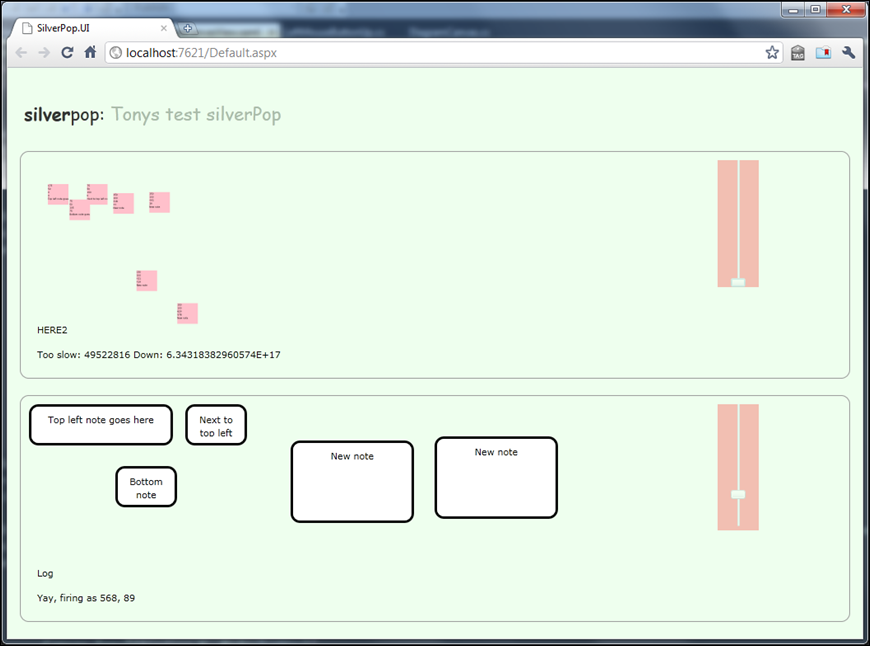
So that’s the idea – I’ve spent around 8 hours on this so far and I’m quite impressed with how far I’ve been able to get – the screenshot below might look like crap, but it’s proving out some of the technical issues I’m interested in; If you’re interested, the top and bottom diagrams mirror each other and have two separate data templates – you can add new notes, move notes around, pan the canvas as much as you like and zoom in and out…. quite good for 1 working day!

image

In coming days I’ll post the full diary, along with all of the source code - I’m keeping a detailed log of the issues I faced and how and why I made the decisions I made in building the application – once I’ve got it all together and the app finished, I’ll post it here. Watch this space!

Wednesday, 26 January 2011

Software development lifecycle – Part I – Introduction

Software development lifecycle – the process of how we build software, the steps we go through to design software, build it, test it, deploy it – it means a lot of different things to a lot of different people, but yet we find that many organisations aren’t really paying close enough attention to their processes and management of software development which leaves them reacting to problems, not knowing when they are going to deliver, delivering features that are irrelevant or lower priority than missing features and with no deep insight into what they are supposed to be delivering in the first place.

I’ve heard a number of teams say “oh, we’re agile"" – and what they mean is they have no specifications, no plans, no timescales and at the end of it, no jobs because the company employing the team went bust waiting for the team to deliver something.

So, in this series of blog posts I want to take a look through some of the things to think about when implementing structure around your development activity – on the one hand you don’t want to just have a team banging away at code with no formal structure, as the example above, but similarly you don’t want to get too binding with this otherwise you’ll end up with Carl (lets call him Carl in this situation) rocking in the corner, muttering about how he’s “too confined and boxed in maaaan” – development is a creative, problem solving process, let them be creative but within some structured boundaries.

I’m going to keep this series open ended an just chew the fat on a different topic each week and see where we come out. Whilst not a list of topics that I’m going to write on individually, below is a list of some of the things I'm going to explore in this series;

  • Typical phases of a project
  • How to understand the problems and get a holistic view.
    • Involve the business or customer early and keep them engaged!
  • Defining the product
    • Why bother
    • What format
    • Who owns the product?
  • Understanding and addressing risk.
    • Prove it – show me the code.
    • The point of spikes.
  • Housekeeping!
    • Keeping track of risks, issues and key decisions.
    • Backlog pruning.
    • Keeping the customer engaged.
    • Other project artefacts.
  • Making a plan – estimation is not about marketing!
  • Iterating and aggressive construction.
  • Transitioning to live/launch.
  • Supporting the product.
  • Managing the team
    • The role of team lead
    • 8 hours does not a day make
    • Motivating technical people.
      • Doesn’t involve putting the dev team in an open plan office next to the sales department hotlines!
      • Continual harassment != productivity.
    • Monitoring progress
    • Dealing with hold ups and blocking issues.
    • Why it’s possible to keep the reigns of management loose and still be impossible to get away with being a slacker.
    • Capability leads and subject (domain) experts.
    • Recruiting technical staff
      • Show me the code!
      • Solve this problem!
      • Welcome on board – induction or abduction?
    • Training and/or free time to experiment.
  • Managing the code, the build and quality
    • Code reviews – still as important today! But let’s not get hung up on the traditional formality.
    • Daily and continuous builds
    • The build wall
    • Unit testing
    • Bugs – squish em soon and squish em often.
      • It works on my machine!
    • Source control.
    • Framework, framework, framework.
  • Strategy
    • Have one!

Monday, 17 January 2011

Quick explanation of generating dynamic WCF client proxies with Unity;

I’ve been using castle windsor for years now and it’s been my favourite IOC and DI container for a long time. On one of my current projects, I’ve been forced to look at Unity a bit more closely and the first thing that came up for me was how to create WCF client proxies automatically from the shared service contracts. This is how I did it;

I configure the container with code at the moment – I don’t know about you but the usefulness of IOC isn’t the fact that you can replace components at runtime, it’s the clean separation and testability that following a loose coupled pattern gives you. So, I configure my container in code – if I needed the ability to replace bits later, I’d devolve just that part of the configuration out to XML or such like, but I wouldn’t start at XML – it’s too easy to introduce a typo and it doesn’t support refactoring easily.

Anyway, so the complexity of registering a WCF client proxy is it doesn’t have a concrete implementation – I have an interface assembly that contains the service contracts and data contracts and I want to tell WCF to wrap the interface with a channel factory and create the resultant channel.

Unity provides a way of doing just that;

_host.RegisterType<TService>(new InjectionFactory(c => new ChannelFactory<TService>(endpointConfigurationName).CreateChannel()));

TService is our interface and endpointConfigurationName is the name of our endpoint configuration in app.config. What this does is when something wants to resolve an instance of TService, it calls the lambda contained within the injection factory and this in turn creates a channel around the interface.

As such, you can then just go ahead and call your interface members and it will wire everything up for you. No need for service references etc, it just works :)

Friday, 14 January 2011

A modicum of security would be appreciated!

My web hosting package was due for renewal today and I received this email (yeah, I’ve redacted some information to protect me and the people in question); I was quite shocked with the content of the URL that was in the body of the email;

image

Yes, you read that right, they sent me an (insecure) email that contains in clear text everything you would need to access my account with that provider. Why bother with that https:// at the beginning of the url if you’re going to stick my username and password in the text of the email body too! You don’t need to try and bypass SSL and watch what is being sent to the site, all you need to do is get hold of the email being bounced (insecurely) around SMTP servers and you can have full unadulterated access to my hosting package! (and possibly more – read on!)

I don’t mean to pick on these guys, they aren’t an isolated case, and other people have articulated why this kind of thing is REALLY bad better than I can so I refer you to Jeff Atwood’s articles on “The dirty truth about web passwords” and his post about “The internet drivers license”.

Update: Forgot to add this link in; Smart enough not to build this website