I've always rejected building web applications that ape desktop applications, but articulating this rejection has always failed me. I've never been able to put my finger on why I don't like fancy ajax interfaces that mimic desktop application, but Jeff Atwood has a post today that explains it extremely well.
Wednesday, 17 December 2008


Tuesday, 16 December 2008
Building a Silverlight RSS reader - part 1 - getting the skeleton structure ready
In this series of posts, I'm going to look at building a simple RSS reader in silverlight. I chose an RSS reader as it covers a number of typical scenarios including;
- Cross domain requests - where you can't guarantee the target domain has a cross domain policy in place.
- A configurable source on the host server controlling which RSS feeds the reader should display.
- Creating a skinnable UI
- Touching on things silverlight can't yet do (display HTML natively for example).
So kicking off, I'm going to create a new solution as follows;

I've selected a new silverlight application and named it RSSReader.UI.Components (as it may contain other components later). I've also chosen to create a directory for the solution and named this SilverlightRSSReader.
VS.NET then asks us how we want to run the application. In this case, I'm going to want to write code on the website too, so I've chosen to create a new ASP.NET web project solution and named it RSSReader.UI.Web

This then gives us the following solution structure;

This needs some tidying up before we begin. First off, delete default.aspx and the test page.html. Finally rename the testpage aspx to default.aspx and also tidy up the source to something more akin to the following;
1: <%@ Page Language="C#" AutoEventWireup="true" %>
2: <%@ Register Assembly="System.Web.Silverlight" Namespace="System.Web.UI.SilverlightControls" TagPrefix="asp" %>
3:
4: <!DOCTYPE html PUBLIC "-//W3C//DTD XHTML 1.0 Transitional//EN" "http://www.w3.org/TR/xhtml1/DTD/xhtml1-transitional.dtd">
5:
6: <html xmlns="http://www.w3.org/1999/xhtml" style="height:100%;">
7: <head runat="server">
8: <title>RSSReader.UI.Components</title>
9: </head>
10:
11: <body style="height:100%;margin:0;">
12: <form id="form1" runat="server" style="height:100%;">
13: <asp:ScriptManager ID="ScriptManager1" runat="server"></asp:ScriptManager>
14:
15: <div id="silverlightHost" style="height:100%;">
16:
17: <asp:Silverlight ID="Xaml1" runat="server" PluginBackground="Transparent" Windowless="true"
18: Source="~/ClientBin/RSSReader.UI.Components.xap"
19: MinimumVersion="2.0.31005.0" Width="100%" Height="100%" />
20:
21: </div>
22: </form>
23: </body>
24: </html>
You finally want to set the default.aspx page to be the page used on start up. You can do this by right clicking on it in solution explorer and clicking set as start page.
If you run your application now, it should compile correctly and show you a rather underwhelming blank silverlight application. Let's correct that and get the basic form and structure of our application ready.
The following is a wireframe for how I want my application to look:

Creating this basic layout is extremely simple using XAML, but first, we want to pull in an image resource for the branding and change the html body colour. Copy in rss.png from the attached zip file, and put it in a new folder called Resource within your silverlight application.
Finally, add the following to the head section of default.aspx;
<style>
    BODY
    {
        background-color: black;
    }
    #silverlightHost
    {
        background-color: Transparent;
        position: absolute;
        width: 100%;
        height: 100%;
        left: 0px;
        top: 0px;
    }
</style>
This is simply setting the window to be black coloured (after all, every silverlight app must be black - it's an unwritten law !!). If you're wondering why we're not just setting the background in the silverlight and instead are setting that to transparent - the reason will become apparent later when we have to have the browser show HTML and we need it to look like it's within our silverlight app.
Next, in your silverlight app, add a reference to System.Windows.Controls.Data - this gives us the data grid component to use in our app.
Finally, open page.xaml and use the following skeleton code;
1: <UserControl x:Class="RSSReader.UI.Components.Page"
2: xmlns="http://schemas.microsoft.com/winfx/2006/xaml/presentation"
3: xmlns:x="http://schemas.microsoft.com/winfx/2006/xaml"
4: xmlns:data="clr-namespace:System.Windows.Controls;assembly=System.Windows.Controls.Data">
5:
6: <Grid>
7: <!-- The main UI stack -->
8: <StackPanel Margin="10,10,10,10">
9:
10: <!-- Top bar area -->
11: <Grid Background="Black">
12: <Grid.ColumnDefinitions>
13: <ColumnDefinition Width="Auto"/>
14: <ColumnDefinition Width="Auto"/>
15: <ColumnDefinition Width="*"/>
16: </Grid.ColumnDefinitions>
17:
18: <Image Source="Resource/rss.jpg" Margin="0,0,10,0"/>
19:
20: <TextBlock Grid.Column="1" Margin="0,6,0,0" FontSize="18" Foreground="White">RSS Exemplar</TextBlock>
21:
22: <ComboBox x:Name="_availableFeeds" Grid.Column="2" Margin="0,6,0,0" IsEnabled="False"
23: VerticalAlignment="Top" HorizontalAlignment="Right" Height="30" MinWidth="250">
24: </ComboBox>
25: </Grid>
26:
27: <!-- Grid binding to articles -->
28: <data:DataGrid x:Name="_articleList" AutoGenerateColumns="False">
29: <data:DataGrid.Columns>
30: <data:DataGridTextColumn Header="Published Date" Width="150"/>
31: <data:DataGridTextColumn Header="Title"/>
32: </data:DataGrid.Columns>
33: </data:DataGrid>
34:
35: <!-- Todo: content preview pane -->
36: <!-- Todo: status area and skin selector -->
37: </StackPanel>
38: </Grid>
39:
40: </UserControl>
Run your application and you should see:

Hardly the most exciting application in the world so far, but it gives us everything we need to build on in the next articles. If you want to skip ahead and try to move the application on, go ahead, the next topics will cover;
- Getting data and binding to it
- Getting available feeds for the combo box
- Getting feed data from the RSS feed itself using an intermediate, marshalling, service.
- Adding a service reference
- Displaying and interfacing to HTML
- Silverlight can't display HTML directly, we need to display the article content itself by asking the HTML host to do it. This article will cover integration to HTML, and will result in a positioned DIV in the correct place beneath the silverlight app to show the post content. (This is why our silverlight is made transparent)
- Skinning the application and changing skins
- This will cover making the app look pretty(ish) and how to dynamically change skins on the fly.
For now, have a good Christmas.
Download the source code here
.
Monday, 8 December 2008
Essential reading
Here's a quick list of what my top 4 general development books that everyone should have on their shelf;
 | Code complete (2nd Edition) Steve McConnell Microsoft Press This is a practical guide to programming in general and the definitive guide to software construction. |
 | Design Patterns - Elements of Reusable object oriented software. Gamma, Helm, Johnson and Vlissides Addison Wesley The famous gang of four OO design patterns book. |
 | Patterns of Enterprise Application Architecture Martin Fowler Addison Wesley This book details many software design patterns found in enterprise software by the Thoughtworks guru, Martin Fowler. |
 | The Mythical Man-Month Frederick P. Brooks Addison Wesley This is a collection of essays on software project management that was first published in 1975. It contains the legendary "Brooks Law" - that adding manpower to a late project makes it later. The concepts laid out in this book are as valid today as they were 30 years ago. |
Tuesday, 2 December 2008
"New XBOX Experience" trashes my 360...
Whilst I like to keep this as a technical blog, I must doff my cap to Microsoft's XBOX 360 warranty and repair service. I bought my 360 in Jan 2006 and didn't have any problems with it until the new XBOX experience was launched a couple of weeks ago.

But that's not the point, first off kudos on extending the warranty to 3 years for this specific error - of which my 360 was just 1 month away from being out of warranty, and secondly for the lightning fast repair service.
I've just logged on to check up on where my unit is, which I only posted to them on Wednesday last week, and they've fixed it and have shipped it back, it's being delivered tomorrow - that's less than 1 week!!
COD: World at war stress relieving marathon due this weekend ;-) The wife will be pleased.....
Tuesday, 18 November 2008
Expand a virtual PC VHD file and extend the partition
Ran into a few problems today, for one client who uses a VPN that doesn't work at all well with Vista, I have an XP development virtual PC. I needed to install visual studio sp1 (yet again) on it but my boot drive only had 4Gb of free space - the temporary installer needs more than that.
After finding the excellent VHD Resizer I was able to resize by virtual disk by an additional 10Gb, however it doesn't extend the disk into this space and diskpart won't let you issue an extend command on the boot disk.
The solution? Boot off another VHD with the resized disk as a second drive, then extend under this environment before shutting down and setting it back to the newly extended drive.
Full answer here...
http://www.enusbaum.com/blog/2008/02/07/expand-a-virtual-pc-vhd-file-and-extend-the-partition/
Sunday, 16 November 2008
Using attached properties to compose new behaviour
I was inspired by a posting on stackoverflow.com - "How do I drag an image around a canvas in WPF" - where the first response in most peoples heads is to work with mouse up/down/move events, track offset positions and move the UI element around in response - pretty reasonable right?
Seeing as WPF's principles favours composition over inheritance and such like, what if instead we used the power of attached properties to attach new behaviour to a UIElement? Here's how to do it, first the code for the dependency property:
public class DraggableExtender : DependencyObject
{
    // This is the dependency property we're exposing - we'll
    // access this as DraggableExtender.CanDrag="true"/"false"
    public static readonly DependencyProperty CanDragProperty =
        DependencyProperty.RegisterAttached("CanDrag",
        typeof(bool),
        typeof(DraggableExtender),
        new UIPropertyMetadata(false, OnChangeCanDragProperty));

    // The expected static setter
    public static void SetCanDrag(UIElement element, bool o)
    {
        element.SetValue(CanDragProperty, o);
    }

    // the expected static getter
    public static bool GetCanDrag(UIElement element)
    {
        return (bool) element.GetValue(CanDragProperty);
    }

    // This is triggered when the CanDrag property is set. We'll
    // simply check the element is a UI element and that it is
    // within a canvas. If it is, we'll hook into the mouse events
    private static void OnChangeCanDragProperty(DependencyObject d,
        DependencyPropertyChangedEventArgs e)
    {
        UIElement element = d as UIElement;
        if (element == null) return;

        if (e.NewValue != e.OldValue)
        {
            if ((bool)e.NewValue)
            {
                element.PreviewMouseDown += element_PreviewMouseDown;
                element.PreviewMouseUp += element_PreviewMouseUp;
                element.PreviewMouseMove += element_PreviewMouseMove;
            }
            else
            {
                element.PreviewMouseDown -= element_PreviewMouseDown;
                element.PreviewMouseUp -= element_PreviewMouseUp;
                element.PreviewMouseMove -= element_PreviewMouseMove;
            }
        }
    }

    // Determine if we're presently dragging
    private static bool _isDragging = false;
    // The offset from the top, left of the item being dragged
    // versus the original mouse down
    private static Point _offset;

    // This is triggered when the mouse button is pressed
    // on the element being hooked
    static void element_PreviewMouseDown(object sender, MouseButtonEventArgs e)
    {
        // Ensure it's a framework element as we'll need to
        // get access to the visual tree
        FrameworkElement element = sender as FrameworkElement;
        if (element == null) return;

        // start dragging and get the offset of the mouse
        // relative to the element
        _isDragging = true;
        _offset = e.GetPosition(element);
    }

    // This is triggered when the mouse is moved over the element
    private static void element_PreviewMouseMove(object sender,
        MouseEventArgs e)
    {
        // If we're not dragging, don't bother
        if (!_isDragging) return;

        FrameworkElement element = sender as FrameworkElement;
        if (element == null) return;

        Canvas canvas = element.Parent as Canvas;
        if( canvas == null ) return;

        // Get the position of the mouse relative to the canvas
        Point mousePoint = e.GetPosition(canvas);

        // Offset the mouse position by the original offset position
        mousePoint.Offset(-_offset.X, -_offset.Y);

        // Move the element on the canvas
        element.SetValue(Canvas.LeftProperty, mousePoint.X);
        element.SetValue(Canvas.TopProperty, mousePoint.Y);
    }

    // this is triggered when the mouse is released
    private static void element_PreviewMouseUp(object sender,
        MouseButtonEventArgs e)
    {
        _isDragging = false;
    }
}
As you can see, we hook into the events exposed from the target element whenever we detect the property being changed. This allows us to inject any logic we like!
To use the behaviour, we include the namespace in XAML:
<Window x:Class="WPFFunWithDragging.Window1"
        xmlns:local="clr-namespace:WPFFunWithDragging"
And then just attach the behaviour to the elements we want to be able to drag like so;
<Canvas>
       <Image Source="Garden.jpg"
              Width="50"
              Canvas.Left="10" Canvas.Top="10"
              local:DraggableExtender.CanDrag="true"/>
   </Canvas>
Cool huh? Sample code attached....
The Enterprise Stack
What makes good software? Separation of concerns has got to be up there in a big way, ensuring you have relevant tiers to your application that deal with a particular set of concerns, but what does an enterprise software stack look like? I've been asked this question a number of times, so thought I would put up one of the ways in which I write software for SOA environments.
To avoid being short down in flames, let me be clear, I'm not advocating any particular dogmatic approach here, just presenting one way that's worked for me in several situations in service oriented environments.
So, here's the simplified picture of the stack:

Database
At the very top of the stack we have the database or persistence engine - the place where our application is going to store it's data. This doesn't have to be a SQL database, but is more a concept of a place to store information. To this end this box could be satisfied by XML, an object database, text files, other external services and so on - indeed there may even be multiple boxes.
The Data Abstraction Layer
This layer is responsible for hooking repositories up to persistence. It should expose an engine flexible enough to work with a variety of types of physical repositories in a natural manner. Generally you won't write your own data abstraction layer, but will instead re-use one of many different technologies already available such as NHibernate, LINQ to Entities, LINQ to SQL and so on.
Repositories
The repositories are responsible for fulfilling requests to obtain and modify data. This allows a further level of abstraction that describes the purpose of the code rather than the implementation. IE: A service will ask a repository to "SelectAllCustomers" rather than directly execute some LINQ query.
Repositories deal in one thing and one thing only - Domain entities. Their inputs and outputs are usually one or more entity objects from the domain (see below). For example, suppose you were writing a pet shop application, you may have a repository for dealing with customers as follows;
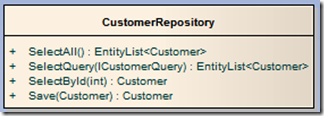
As you can see we have methods for retrieving customers and for updating them. This makes working with customers extremely clear and self describing. The first method - SelectAll() will simply return all of the customers in the system (as customer Domain objects). SelectQuery will allow the description of how to get data, sort it and present it.... eg, using the CustomerQuery, one might be able to specify the sort order and direction, filters on fields, along with which rows to return for pagination.
Each type of conceptual data would have it's own repository in the stack.
(One alternative to using repositories is the active record pattern where entities expose methods and functions similar to those exposed from repositories)
Domain Entities
The domain model (in this instance) is a representation of the various entities that make up the problem you are describing along with their relationships and any operational logic (business rules).
The following is an example of a simple domain model, working again with the fictitious pet shop example.

In the diagram above we can see we have a customer entity, which has attributes describing the customer. It also contains a collection of Order entities representing the orders that this customer has made. Each order must have a customer, but a customer can have 0 or more orders.
Where an order exists, this will have attributes of it's own to describe the order, along with a collection of order lines (0 or more). Each order must have one and only one customer.
Moving down the graph, the order line will know which order it belongs to and also reference a product that the line of the order corresponds to. Each order line can only be within one order and it must also reference a product.
As you can see, the domain model is just the object graph of the entities it represents. There may of course be more meat on the bones of your real life domain model, including operations on entities to implement business rules and such like.
So, how does the repository return all of this information - where we simply invoke SelectById(10) to get the customer entity with an ID of 10? Well, the answer is actually in the DAL and repository layer.
NHibernate and other OR/M technologies allow for something called Lazy loading - where the initial query loads the Customer object, but then wraps it's properties (called proxies) so that when they are invoked, it actually automatically goes back to the database to get the entities required.
A second alternative is to describe how deep you want the graph to load in the repository implementation (or even make this a factor of the query parameter to allow control further down the stack). Again, most OR/M's allow you to specify what you want to load from the graph - such as specifying to load the orders and order lines for a customer at the same time as it gets the customer. This usually offers some performance gains too as only one query is executed. (And in fact is your only option if you are using LINQ to entities as of V1, which doesn't support lazy loading).
Regardless, your DAL or your repositories should be able to hydrate an object graph based on a request from further down the stack, and should also ensure that when you do get an object from the database, it only get's one instance of it!! (IBATIS for example doesn't do this by default and you must implement your own Identity Mapper pattern that is used by repositories).
Service implementations
These are the actual end-points of your service - the ASMX you call, or in the case of WCF (my preference), the endpoints you've defined and implemented through service contracts.
The service is responsible for taking an in-bound request object, working out what to do next, then invoke the appropriate repository methods to get or affect data before then assembling a response back to the caller.
In other words, the service is invoked using a data contract in the form of a data transfer object (see below), it then, if necessary hydrates a domain object graph ready for use by repositories before invoking them and getting back domain objects. When it does, it uses assemblers (see below) to convert the full data representation from the domain into a structure of data that the client application is actually interested in (DTOs).
Data Transfer Objects - DTOs
The purpose of DTOs is to represent the data needed to complete an activity in it's most minimal form for transmission over the wire. For example, where a client application is interested in customers, but is only interested in the customer's name and ID, but not the other 20 fields, your DTO would only represent customers as name and ID. They are lightweight representations.
Communication between client applications and the service tier is done only through the use of DTO objects.
Interestingly DTO type objects may be present in your domain (but not called DTOs). You may have several different representations of customer for instance in order to optimise how much information flows across the network between the domain model and the database. The trade off is how simple you want to keep your domain versus how much control you want over database performance.
Assemblers
The assemblers are used by the service implementations to map between the conventions of DTO and Domain. For example, if you have a DTO contract for updating a customer, an assembler would take this DTO and map it to a valid customer domain object. This would then be passed to the repositories for serialisation.
Service Proxies
Hopefully this requires very little explanation, the service proxy is a client side implementation of the service implementation that maps to the communications channel and invokes the actual code on the service tier. Your client application works exclusively with the service proxies and the DTO's that it expects and returns.
Conclusion
This is just one way to build scalable N-tiered enterprise applications. Several of the concepts presented here are interchangeable with other methods - such as active record instead of domain + repository. Speaking from personal experience I have seen the above work very well on large scale implementations.
It is also worth mentioning some supporting concepts. To truly realise benefit from the above implementation, one would need to use interface driven development to allow any piece of the stack to be mocked and unit tested effectively. In addition, dependency injection can make your life easier as the scale of the system grows, automatically resolving dependencies between various objects between the tiers.
In the future I will post a simple example application with source code that uses all of the above techniques to demonstrate the implementation specifics. I hope this was worth writing and someone finds it useful.
Friday, 14 November 2008
Microsoft Tech-Ed is over, I'm going back to work for a REST
It's a shame that it's over for another year, and its been a fantastic, if somewhat tiring, week that I've thoroughly enjoyed. They cram in as much information as they can in the 5 days of the conference and provide you with everything you need to stay comfortable during the duration.
On the social front, things were also good, the country drinks event was great on Wednesday night, and Barcelona overall was a cool place to hang out and chat about the day.
The inhabitants of Barcelona must think there's a geek invasion or something though as every third table in the restaurants was debating Azure, L2E, federation in the cloud or whatever - but if that didn't convince them, then watching the games at the country drinks evening would have.
One of the games during the night out was a form of bowling using a tennis ball. After the person had bowled, the ball was thrown back to the bowler. You could tell we were at a geek conference though as not one person managed to catch the ball!!!
If anyone is thinking about Tech-Ed 2009 (in Berlin next year), I wouldn't hesitate to recommend it

Day 5 - 13:30 : An introduction to Oslo (mostly M)
This session, run by Jon Flanders focused on the new M modelling language - specifically MSchema and MGrammar. To be honest the entire session concentrated on using MSchema to generate T-SQL to create a database which I didn't feel was a great example and certainly wasn't real world.
We already have a perfectly good textual DSL for building databases - it's called T-SQL, and just like the DSL, it can be split across multiple files, can generate data, and can be stored in source control for versioning.
I really like Jon Flanders, he's a great guy, and he did a much better job of presenting M that I ever could, but I honestly didn't enjoy this session one bit.
Day 5 - 10:45 : Data access smackdown! Making sense of Microsoft's new data access strategy (DAT02-IS)
Stephen Forte, Chief Strategy Officer from Telerik, started this interactive session reviewing the history of Microsoft's data access offerings and then discussing the latest multitude of choices. As this was an interactive session, there were lots of questions, comments and debates going on throughout.
A quick history - Microsoft gave us ODBC, then DAO with JET was sat on top of this, RDO wrapped DAO and ODBC, and then there was ODBCDirect. I can remember working with all of these technologies, so I must be getting on a bit now! (not really, I'm 35, technology just changes quickly). Anyway, from this they gave us ADO and with the release of .NET, we got ADO.NET.
Today we have a bunch of options available and moving forward into the future, we're going to have even more choice. Sat atop of ADO.NET we have the conceptual model LINQ technologies (LINQ to SQL, XML, Entities, REST) along with cloud services (Azure) and SSDS (now SDS). That's without even thinking about 3rd party solutions like NHibernate, SubSonic etc - although these were also discussed.
The debate was on-going concerning which technology should be used in which context, and as ever - there is "No Silver Bullet" - the stock answer to such a question is, and should be, it depends.
Choosing which data access strategy you use should be one that gives the highest return for least complexity - not just the one that seems the most technically pure as this is purely subjective - eg: "objects first" people are going to look for OR/M, "data first" guys are looking for T-SQL and so on....
If this means you want OR/M and are using TDD or you need facilities like lazy loading (and you don't always!), then avoid the entity framework - which doesn't cope well with either. In that scenario, perhaps you'd stick to NHibernate. On the other hand if you want highly optimised database queries and you want full control over them for whatever reason, use plain old ADO.NET. Maybe if you're writing a system that doesn't need lazy loading or you're not using TDD, then perhaps the entity framework is a great way to very quickly get started using entities with very little code.
I get frustrated by dogma and elitists saying there's only one way to do things - the way they do it! We all have our preferred way of working, and I'm the first to promote various strategies and techniques as being good options, and sure, I'm occasionally guilty of being dogmatic, but dogma hurts objectivity - we should always consider the project in question and what is best for it rather than fly flags and banners.
Stephen was questioned about, and acknowledged the vote of no-confidence and it's validity - and he made a very, very good point - this is V1 of the framework. The guys involved in EF are aware of it's limitations and are working to resolve them, but are heading in the right direction at least. Personally, I feel I came out of this session a little less dogmatic and a little more objective.
Subscribe to:
Posts (Atom)